
Noise Viewer - frequency fluctuation detector1.0 - App Store
You'll be able to see results in few seconds.
Publisher Description
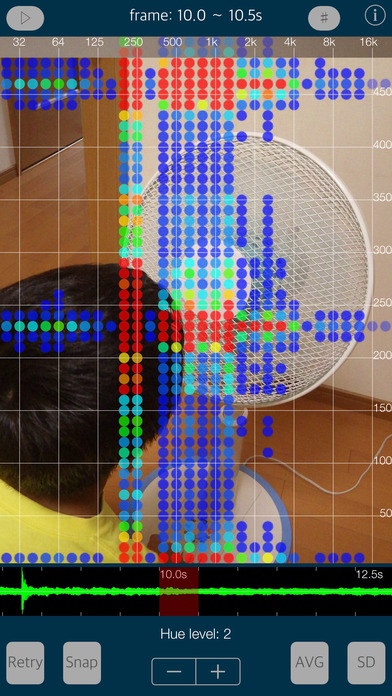
Noise Viewer is a new sound analysis app that can visualize the frequency fluctuation in the noise sound. It can detect the frequency variation noise that can not be measured by the traditional sound analysis.
You may feel a beating noise sound in the familiar sounds daily?
For examples, car engine sound, air conditioning, refrigerator, motor rotation sound, ventilation fan, winds, cry of bugs, , , so it might be a harsh noise for you.
This app will help you to investigate the noise cause in the sound.
After the app launching, Noise Viewer runs the camera capturing and the sound recordings simultaneously on Recording mode. If you find the sound source of your interest, please press "shot" button to analyze the sound source of the previous 15 seconds. Then, it will be displayed on the noise analysis results with the captured image.
The noise analysis results will be displayed the intensity of the energy classified by color, as the fluctuation frequency component on the vertical axis and the frequency spectrum analysis on the horizontal axis. The signal strength of each frequency will be drawn full color graphics. It is more stronger as the color graphic becomes close to red.
In addition, you can continuously play back the visualization results of the sound source.
For your comfortable life, try to find an unpleasant sound like a beat sound. It will help to resolve your sound problem.
Feature:
- Fluctuation frequency noise visualization with the captured image.
- Display of noise analysis:
Frequency spectrum analysis on the horizontal axis : 20 - 20000 Hz by the log-scale.
Fluctuation frequency component on the vertical axis : 5 - 500 Hz by linear scale.
Intensity of the energy classified by color : Stronger as the color becomes close to red.
- Time scaler of recorded waveform : 0 - 15.0 sec. (unit per 0.5 sec.)
- Recording time : 15 seconds (maximum) as just before tapping Stop .
- Analysis frame time : 0.5 sec.
- Frame numbers : 30 frame.
- Hue control for the color dot : 0 - 10 level.
- Grid scale display (#)
- Capture function to Photos. (Snap)
- Retry to record sounds and analysis. (Retry)
- Average value (AVG)
- Standard Deviation (SD)
- Playback function : Display of the noise analysis with recording sound.
Operating procedure:
# Recording mode
1) Launch this app or Tap "Retry", it starts collecting the sound on Recording mode.
2) Tap Shot button to process the sound analysis for the previous 15 seconds, and captures the still image at same time.
# Analysis mode
1) Display of the noise analysis result on Analysis mode.
2) Select a sound frame on "Time Slider" (waveform display).
3) Setting the noise analysis controls by Hue level , # , AVG and SD .
4) Tap Retry to analyze the new sound sources again.
# Playback mode
1) Tap the top left button on Analysis mode, it selects Playback mode.
2) Tap the Play button, the playback is done.
Note:
When two sound waves of different frequency approach your ear, the alternating constructive and destructive interference causes the sound to be alternatively soft and loud - a phenomenon which is called "beating". The beat frequency is equal to the absolute value of the difference in frequency of the two waves. Beats are caused by the interference of two waves at the same point in space.
Important settings:
At the time of the first access to Camera/Microphone/Photos after installing the app, you will be asked authorization to access them by the iOS system. If you have not enabled this setting, the app can not access them by privacy restrictions of the iOS system. Please enable the access permission on the iOS setting, "Settings > Privacy > Camera or Photos or Microphone".
TOON,LLC is a company that seeks the comfort of sound environment based on our acoustic proprietary technology, and we will provide tools for audio professional, sound technology, home theater installer, and anyone who loves audio.
Requires iOS 9.3 or later. Compatible with iPhone, iPad, and iPod touch.
About Noise Viewer - frequency fluctuation detector
The company that develops Noise Viewer - frequency fluctuation detector is TOON,LLC. The latest version released by its developer is 1.0.
To install Noise Viewer - frequency fluctuation detector on your iOS device, just click the green Continue To App button above to start the installation process. The app is listed on our website since 2016-09-15 and was downloaded 0 times. We have already checked if the download link is safe, however for your own protection we recommend that you scan the downloaded app with your antivirus. Your antivirus may detect the Noise Viewer - frequency fluctuation detector as malware if the download link is broken.
How to install Noise Viewer - frequency fluctuation detector on your iOS device:
- Click on the Continue To App button on our website. This will redirect you to the App Store.
- Once the Noise Viewer - frequency fluctuation detector is shown in the iTunes listing of your iOS device, you can start its download and installation. Tap on the GET button to the right of the app to start downloading it.
- If you are not logged-in the iOS appstore app, you'll be prompted for your your Apple ID and/or password.
- After Noise Viewer - frequency fluctuation detector is downloaded, you'll see an INSTALL button to the right. Tap on it to start the actual installation of the iOS app.
- Once installation is finished you can tap on the OPEN button to start it. Its icon will also be added to your device home screen.
Program Details
System requirements
Download information
Pricing
Version History
version 1.0
posted on 2016-09-15
Disclaimer
Official App Store Link
We do not host Noise Viewer - frequency fluctuation detector on our servers. We did not scan it for viruses, adware, spyware or other type of malware. This app is hosted by Apple and passed their terms and conditions to be listed there. We recommend caution when installing it.
The App Store link for Noise Viewer - frequency fluctuation detector is provided to you by apps112.com without any warranties, representations or guarantees of any kind, so access it at your own risk.
If you have questions regarding this particular app contact the publisher directly. For questions about the functionalities of apps112.com contact us.
